Blog • Jul 16, 2026

Strengthen trust. Improve open rates. Keep every send fully on-brand.
When you send recognition, celebrations, or company-wide announcements, branding matters more than you think. The design of the eCard is important — but the sender is what determines whether it gets opened.
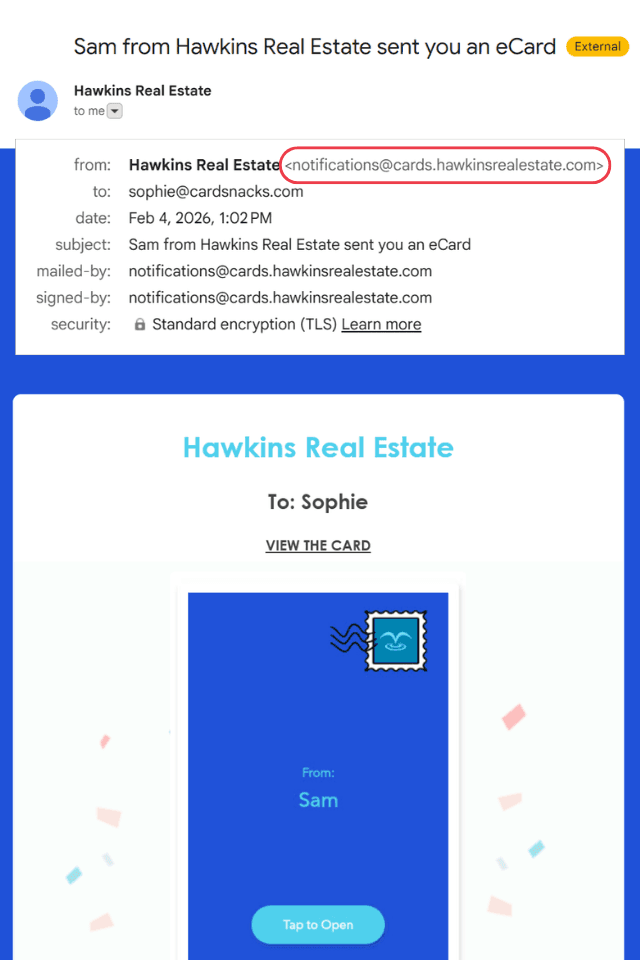
With CardSnacks for Business, you can send eCards directly from your own company email domain — so they appear to come from you, not us. Instead of a third-party sender address, your employees see something familiar and trusted: cards@yourcompany.
That immediate brand recognition creates confidence. It signals legitimacy. And it dramatically reduces the chances of your message being ignored or flagged as “spammy.”
1. Increase Trust & Recognition
When employees and clients recognize the sender domain, they’re far more likely to open the message. Familiar branding reduces hesitation and builds confidence.
2. Improve Open Rates
Messages sent from your domain feel internal, not promotional. That means fewer “spammy” perceptions and higher engagement.
3. Keep Messaging Fully On-Brand
From the sender name to the domain, your communications remain consistent with your company identity.
And the best part?
Setup is safe, reversible, and usually takes just 5–15 minutes.
You Need:
To get started, you’ll simply need access to whoever manages your company’s DNS settings. This is often:
Decide which domain you’d like emails to come from.
Common choices include:
We recommend using a subdomain (like cards.yourcompany.com) when possible, but it’s completely optional.
We’ll provide the exact records to copy and paste. You’ll add:
These are standard, industry-wide email authentication settings used by companies everywhere.
Once your DNS records are added:
No additional steps required.
Once verified:
It’s seamless for your team — and powerful for your brand.
If you don’t manage DNS yourself, simply forward these instructions to your IT or web provider.
If they have questions, we’re happy to help: 📧 [email protected]
Can this break our email?
No. This does not impact incoming mail or existing mailboxes.
Can we undo this?
Yes. Removing the DNS records immediately disables sending from your domain.
Do you get access to our email?
No. This only grants permission to send eCards on your behalf.
Is this required?
Not at all. You can continue sending from our domain if you prefer.